
A useful Pokémon card scanner helps you confirm the exact printing before showing a price. In DexScan, scan one card, compare the set, number and language with the card in hand, then open the appropriate market or graded price view.
Start with a card you can verify
Choose a card with a legible number. Before scanning, note the set, full collector number and language. Turn the card under light to check the finish if it is shiny. Open Scan card in DexScan, keep all four corners visible and wait for the camera to focus on the small print.
Confirm the match before saving it
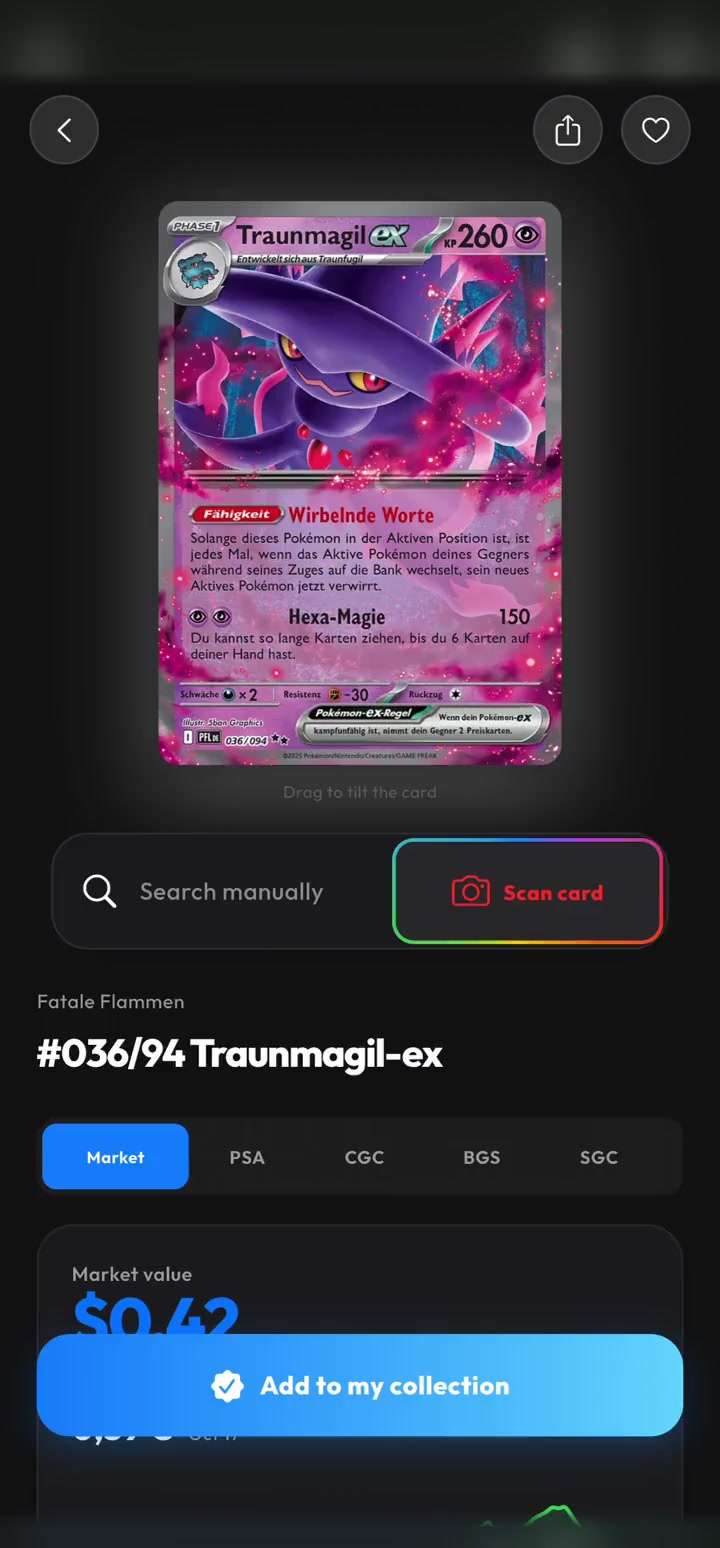
The card detail screen shows the matched set and number. Compare both with the physical card rather than trusting the artwork alone. If either differs, tap Search manually and use the printed name and complete number. Check the finish before using a variant price.
Read the price for the card you own
Start with Market for an ungraded card. For a slab, choose the company and grade on its label where data is available. A market reference is not a completed sale. Check the date, currency and source when shown, especially before buying or trading.
Save the card or keep it on your Watchlist
Use Add to my collection for a card you own. If you are still looking for the card, use the heart to add it to your Watchlist instead. Keeping these lists separate makes it easier to see which cards you own and which ones you want next.
Understand the three steps: match, price, save
The scanner makes a suggestion about identity. The price view answers a separate question about the matched card. Saving creates a collection record. Check each step in that order. If the card is identified but no matching price exists, you can still keep an accurate inventory without borrowing a price from a different version.
DexScan’s recorded German Traunmagil-ex result shows where to find the set and collector number, where to switch between market and grade views, and how to add a card to the collection. The card face shows 036/094, while the app presents 036/94. The leading zero in the printed set total does not make it a different card. The printed language and expansion still need to agree.
When to scan and when to search manually
Use the camera for a clear card you have in hand. If a sleeve reflection blocks the printed number, move the light and try one clearer photo. If you can already read the number or are looking at a seller’s listing, start with manual search and include enough set information to disambiguate the result.
A card show is a good place to make this choice quickly. Find one exact version and one useful reference, then compare it with the physical card and its condition. If the seller’s photo or the app’s data omits a detail that matters, keep the price provisional. You can save the candidate and verify it before buying.
Example: two Charizard ex cards from one set
English Scarlet & Violet—151 contains Charizard ex 006/165 and 199/165. If the scanner suggests 006/165 while your copy says 199/165, stop before adding it. Search again with the full printed number. Confirm that the artwork and language also match, then reopen the price view for that result.
The same checklist applies to a holo and a reverse holo with the same number. When the number cannot distinguish the finish, move the physical card under indirect light and compare which areas shine. If a price provider does not indicate the finish, treat that quote as a broad reference rather than the exact value of your copy.
Check what you can do before subscribing
DexScan is free to download on iPhone and iPad with limited free scanning. Try the capture, manual search and price view before deciding whether you need more captures or premium tools such as digital binders. The paywall and Apple purchase sheet show the billing terms for your account and storefront.
If you are on Android, join the launch waitlist using the Google Play button. Enter your email to be notified when the app becomes available there. The waitlist does not install the app or give access to the iOS version.
What a card scanner does not establish
Recognition does not authenticate a card, assign a professional grade or guarantee a selling price. Surface wear, edge whitening and small dents can affect a card’s condition even if the scanner finds the right printing. If you are pricing a sale, inspect both sides and check comparable completed transactions for the same printing and condition.
Checklist for your first DexScan scan
Work through the list with a card you know, then try a sleeved foil or another language. Keep the items you could not verify separate.
| Criterion | Pass check | What to note |
|---|---|---|
| Card identity | Set, number and language match | Record the initially suggested card as well as the final one. |
| Variant | Finish or stamp matches the physical copy | Check how the app handles an uncertain finish. |
| Price | Reference works for the same version | Note source, currency and whether it is a reference or transaction. |
| Collection | You can correct a record and find it again | Try one duplicate, one edited result and one saved target. |
| Access | The steps you use fit the plan | Compare included captures, recurring terms and the extra features you would actually use. |
What to do next
A useful scan gives you a result you can verify, a price reference you can interpret and a collection entry you can find again.