
Scan one card in even light, keep its edges and small print visible, then compare the result with the physical card. The artwork is a useful first check; the collector number, language and finish decide whether it is the right match.
Should you scan a card or search its number?
Use the camera when you have the card and can see the whole front. Use manual search when you are working from a seller’s photo or can already read the number. If you are checking a possible fake, the result gives you a reference to compare with the physical card.
Start with one card and good light.
Place the card on a plain surface with indirect light. Keep the full card inside the camera frame and hold still. Move a reflective sleeve or angle the light if glare hides the name, set number or text.
Check more than the artwork.
Different printings can share similar artwork. Compare the displayed card name, collector number, set and language with the physical card. A correct-looking picture alone does not establish the exact printing.
Confirm the finish and condition.
Holo, reverse holo and other finishes may carry different values. A camera result is not a professional condition assessment. Choose the appropriate available variant and review your card’s corners, edges and surface separately.
Treat a price as context.
Market data varies by provider, region and coverage. Look at the label and date where shown. An estimated market value is not a guaranteed buyer offer. If data is unavailable, do not substitute a price from another language or edition without clearly identifying it as a comparison.
Save with a little structure.
After checking the match, add the card to a collection or binder. A meaningful binder name makes later browsing easier. Keep desired cards in a Watchlist rather than mixing them with cards you own.
A complete scan from camera to collection
Start with one card on a matte surface. Open the scanner and align the card so the whole front is inside the frame, including the bottom edge. Wait for the small print to sharpen. A scan can suggest a candidate before you have confirmed the match; treat the result as a starting point. Move to the details and compare the number and printed language with the physical card.
Once the match is correct, open the price view if you need it and read which variant the price describes. If you only want an inventory, you can save a confirmed card even when you do not have a useful price. Later, check the saved result and quantity in your collection. This separates three different tasks: recognising the card, checking a reference price and keeping a correct record.
Change one thing when a scan fails
If the small number is blurry but the background is sharp, give the camera time to focus and move back slightly. If the number disappears in a bright stripe, move the light instead of repeatedly photographing the same glare. If another card keeps being detected, clear the background. If the app already shows a confident but wrong candidate, another identical photo is unlikely to add a useful clue.
A sleeved card does not have to come out for every scan. Start by changing the light angle and holding the phone steady. If removing the card could damage it or the sleeve is tight, leave it in place and type what you can read. For a card with a scratched sleeve, manually compare the name, collector number, set and finish in that order.
Example: the scan found the right character but the wrong card
Imagine the result says Charizard ex 006/165 but your card’s lower edge reads 199/165. Both names can look plausible, and both numbers belong to English Scarlet & Violet—151. The number mismatch is enough to stop. Search the exact number with the name, recheck the artwork and language, and use the price view from the matching record only.
If the set and number agree but you are unsure about holo or reverse holo, look at the card as you move it under diffuse light. A still photo may not capture where the foil appears. Leave the finish unconfirmed if you cannot distinguish it; a second physical check can be more helpful than another camera capture.
What if the card still isn’t recognised?
Try manual search using the printed number with any leading zeros, letters or promo prefix. If your result is in another language, do not substitute it to make the scanner appear successful. For a worn card with a missing number, write down the legible clues and compare them with a reliable checklist before assigning a price. Some printings have no useful comparable price even if they can be identified.
Keep a short review routine
When scanning several cards, pause after a row or a small stack. Compare the expected total with the number of cards you saved and check that duplicates have the right quantities. Put cards you want on a separate Watchlist so they do not appear among cards you own. If you are doing a binder, keep the physical order until the page is reviewed.
If the scanner keeps missing the card
| What you see | What to try next |
|---|---|
| A bright patch covers the text | Move the light or tilt the card slightly. Check that the name and small collector number become readable. |
| The art is sharp but the number is blurry | Let the camera refocus and hold still. Do not crop away the bottom edge to make the artwork larger. |
| The sleeve reflects the room | Change the angle first. If it is safe for the card, carefully remove a reflective outer sleeve. |
| The result looks familiar but the details differ | Check language and printing. Correct the match before saving or using the price. |
| Repeated attempts still fail | Use manual search if available, entering the printed name or number. Do not save a close-looking card just to finish the scan. |
These checks improve the input; they do not guarantee recognition of every card, damaged label or reflective finish. A scanner also cannot establish authenticity from a successful catalog match.
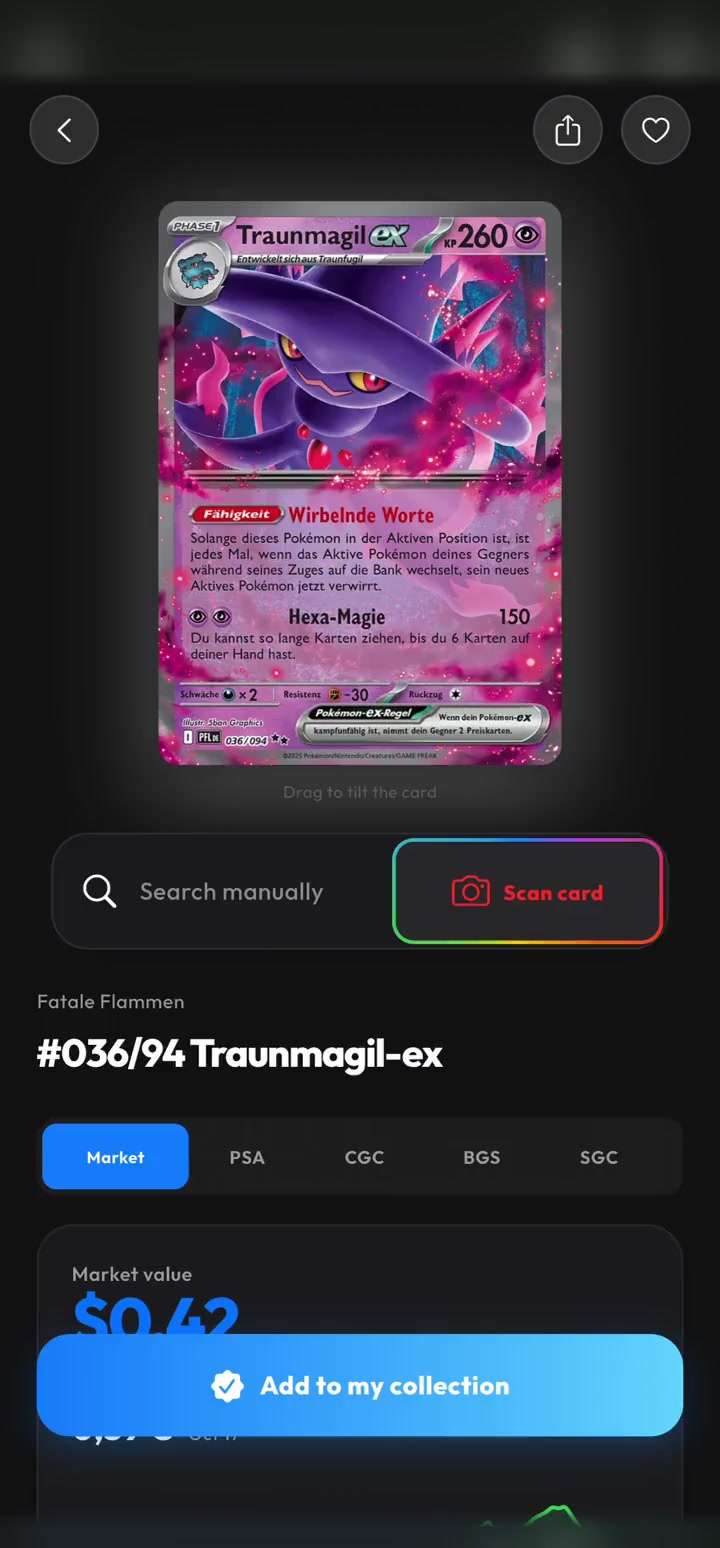
When to retake and when to search
Start with the first row that matches what you see. A second photo is useful when it adds a clue; a manual search is better when the photo is already clear.
| What you see | Next step |
|---|---|
| Name sharp, number blurry | Move the phone back slightly, let it refocus and check the lower edge. |
| Foil glare over the number | Move the light, not the card, if it needs to stay in a binder pocket. |
| Correct name, wrong number | Search using the entire printed number with the set and name. |
| Exact match, no reliable price | Keep the verified identity and find a separate matching reference if needed. |
What to do next
If the photo is clear but the number in the result differs, search by the printed number instead of taking the same photo again.